1. 의존성 확인
Maven Repository 에서 Maxmind 의존성을 확인한다.
2. 서버망을 고려한 application.yaml 설정
- src/main/java/.../resource/application.yaml 에 geoip 설정 추가
geoip:
  database:
    path: /etc/maxmind/GeoLite2-City.mmdb
개발PC인 profile : local 인 경우는 resource/ 밑에 위치한 .mmdb 를 사용하고
그외 dev, stg, prod profile 에서는 data 용 path 를 등록하여 사용한다.
3. Configuration
SpringBoot 에서 MaxMind 전용 configuration 생성
import com.maxmind.geoip2.DatabaseReader;
import org.springframework.beans.factory.annotation.Value;
import org.springframework.context.annotation.Bean;
import org.springframework.context.annotation.Configuration;
import org.springframework.core.io.ClassPathResource;
import org.springframework.core.io.Resource;

import java.io.File;
import java.io.IOException;
import java.io.InputStream;

@Configuration
public class MaxMindGeoIp2Config {

    // application yaml 의 db 파일 경로
    @Value("${geoip.database.path}")
    private String databasePath;

    @Bean
    public DatabaseReader databaseReader() throws IOException {
        File databaseFile = new File(databasePath);

        // 1. 경로 설정이 되어 있고, 실제 파일이 존재하는지 확인
        if (!databasePath.isEmpty() && databaseFile.exists()) {
            return new DatabaseReader.Builder(databaseFile).build();
        }

        // 2. 위 조건이 맞지 않으면 resources 폴더의 기본 파일 사용
        Resource defaultResource = new ClassPathResource("maxmind/GeoLite2-City_20260206/GeoLite2-City.mmdb");

        // 3. 파일 읽어서 DatabaseReader 에 로딩
        // resources 내의 파일은 File 객체가 아닌 InputStream으로 읽어야 JAR 배포 환경에서 오류가 발생하지 않음.
        try (InputStream inputStream = defaultResource.getInputStream()) {
            return new DatabaseReader.Builder(inputStream).build();
        }
    }
}
4. Filter
SpringBoot 에서 해외 접속을 방지하거나 짧은 시간에 해외 접속을 감지하도록 할 수 있다.
다양한 상황에서 다양한 방법으로 필터를 적용하는 방법을 알아보자
4.1. Servlet 밖 Request Filter
이 방법은 Servlet 밖에서 Request 를 필터링하는 방법이다.
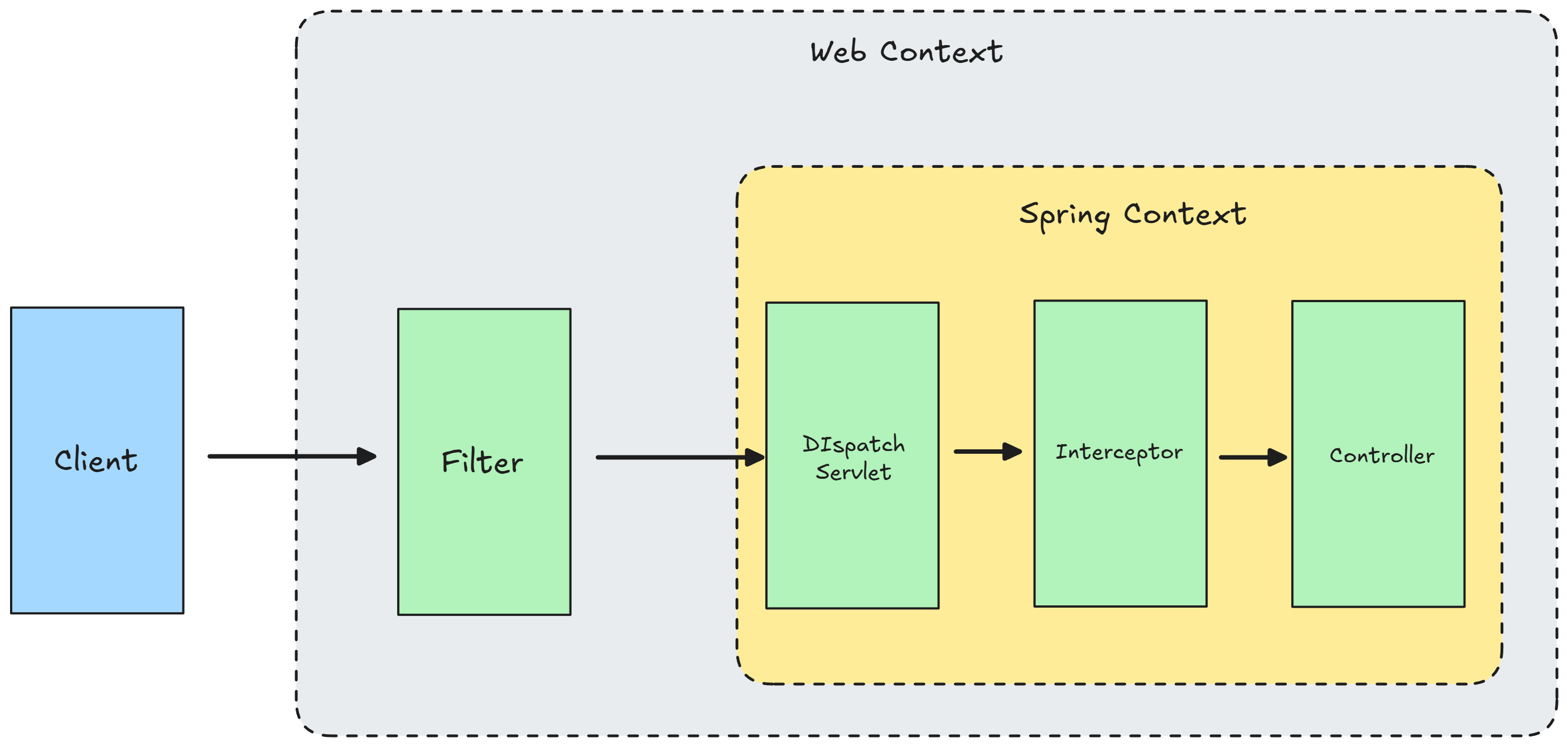
스프링의 비즈니스 로직인 Controller 에 진입하기전에 필터링이 되는 방식이다.
- Request 도착: 웹 서버(Tomcat 등)에 요청 들어옴
- Filter Chain 실행: 설정된 필터들이 순차적으로 실행. OncePerRequestFilter가 바로 이 단계에서 동작함.
- DispatcherServlet 도달: 모든 필터를 무사히 통과해야 비로소 스프링의 핵심 관문인 DispatcherServlet에 도달합니다.
- Interceptor 및 Controller: 이후 인터셉터를 거쳐 실제 @RestController의 메서드가 실행됩니다.
아래 예제는 특정국가 이외의 접속을 전부 차단하는 방식이다.
import com.maxmind.geoip2.exception.GeoIp2Exception;
import com.maxmind.geoip2.model.CityResponse;
import io.spring.toolkit.geolocation.HttpUtil;
import jakarta.servlet.FilterChain;
import jakarta.servlet.ServletException;
import jakarta.servlet.http.HttpServletRequest;
import jakarta.servlet.http.HttpServletResponse;
import lombok.RequiredArgsConstructor;
import org.springframework.context.annotation.Profile;
import org.springframework.stereotype.Component;
import org.springframework.web.filter.OncePerRequestFilter;

import java.io.IOException;

@Component
@RequiredArgsConstructor
@Profile("!local")
public class MaxMindGeoIp2RequestFilter extends OncePerRequestFilter {
    private final MaxMindGeoIp2Service maxMindGeoIp2Service;

    @Override
    protected void doFilterInternal(HttpServletRequest request, HttpServletResponse response, FilterChain filterChain) throws ServletException, IOException {
        String ipAddress = HttpUtil.getIpFromHeader(request);
        if (HttpUtil.isLocal(ipAddress)) {
            filterChain.doFilter(request, response);
            return;
        }

        try {
            CityResponse location = maxMindGeoIp2Service.getLocation(ipAddress);

            // 2. 국가 정보 확인 (null 체크 및 KR 코드)
            if (location != null && location.country() != null) {
                String countryCode = location.country().isoCode(); // "KR"

                if (!"KR".equals(countryCode)) {
                    // 여기서 예외를 던지면 RestControllerAdvice가 잡지 못함
                    response.sendError(HttpServletResponse.SC_FORBIDDEN, "Access Denied: Only South Korea allowed.");
                    return;
                }
            }

            filterChain.doFilter(request, response);
        } catch (GeoIp2Exception e) {
            throw new RuntimeException(e);
        }
    }

    @Override
    protected boolean shouldNotFilter(HttpServletRequest request) throws ServletException {
        String path = request.getRequestURI();
        return path.startsWith("/css/") || path.startsWith("/js/") || path.startsWith("/images/") || path.startsWith("/favicon.ico") || path.startsWith("error");
    }
}
shouldNotFilter override 한 정의를 보면 css, img 등 리소스 및 예외 처리이므로 필터링하지게 설정할 수 있다.
MaxMind GeoIp2 이외 DB-IP 같은 GeoLocation 을 사용해서 Cross check를 하는 것이 좋다.
DB-IP 도 전용 로컬 DB가 있고 Jar는 MaxMind 것을 사용하므로 도입시 코스트가 적다는 장점이 있다.
이 예제는 OncePerRequestFilter 사용법에 집중하는 예제이며 (1) 특정국가 만 접속 차단, (2) 특정국가들만 접속 차단, (3) 특정국가들만 접속 허용 등등 다양하게 활용하면 된다.
4.2. Spring Security Filter
Spring Security 도입 시 SecurityConfig 에서 Filter 를 추가하는 방식이다.
Filter
우선, Filter 를 생성한다.
예제 소스의 포인트는 OncePerRequestFilter 와 Component 가 없다는 것이다.
Configuration 에 직접 등록할 필터이므로 Component 를 사용하지 않는다.
import com.maxmind.geoip2.exception.GeoIp2Exception;
import com.maxmind.geoip2.model.CityResponse;
import io.spring.toolkit.geolocation.HttpUtil;
import jakarta.servlet.FilterChain;
import jakarta.servlet.ServletException;
import jakarta.servlet.http.HttpServletRequest;
import jakarta.servlet.http.HttpServletResponse;
import lombok.RequiredArgsConstructor;
import org.springframework.context.annotation.Profile;
import org.springframework.stereotype.Component;
import org.springframework.web.filter.OncePerRequestFilter;

import java.io.IOException;

@RequiredArgsConstructor
@Profile("!local")
public class MaxMindGeoIp2Filter extends OncePerRequestFilter {
    private final MaxMindGeoIp2Service maxMindGeoIp2Service;

    @Override
    protected void doFilterInternal(HttpServletRequest request, HttpServletResponse response, FilterChain filterChain) throws ServletException, IOException {
        String ipAddress = HttpUtil.getIpFromHeader(request);
        if (HttpUtil.isLocal(ipAddress)) {
            filterChain.doFilter(request, response);
            return;
        }

        try {
            CityResponse location = maxMindGeoIp2Service.getLocation(ipAddress);

            // 2. 국가 정보 확인 (null 체크 및 KR 코드)
            if (location != null && location.country() != null) {
                String countryCode = location.country().isoCode(); // "KR"

                if (!"KR".equals(countryCode)) {
                    // 여기서 예외를 던지면 RestControllerAdvice가 잡지 못함
                    response.sendError(HttpServletResponse.SC_FORBIDDEN, "Access Denied: Only South Korea allowed.");
                    return;
                }
            }

            filterChain.doFilter(request, response);
        } catch (GeoIp2Exception e) {
            throw new RuntimeException(e);
        }
    }

    @Override
    protected boolean shouldNotFilter(HttpServletRequest request) throws ServletException {
        String path = request.getRequestURI();
        return path.startsWith("/css/") || path.startsWith("/js/") || path.startsWith("/images/") || path.startsWith("/favicon.ico") || path.startsWith("error");
    }
}
SecurityConfig
생성한 Filter 를 적용해보자.
@Configuration
@EnableWebSecurity
@RequiredArgsConstructor
public class SecurityConfig {
    private final MaxMindGeoIp2SecurityFilter geoIp2RequestFilter;

    @Bean
    public SecurityFilterChain filterChain(HttpSecurity http) throws Exception {
        http
                .csrf(csrf -> csrf.disable()) // 예시 설정
                .addFilterBefore(geoIp2RequestFilter, UsernamePasswordAuthenticationFilter.class) // 로그인 필터 '직전'에 실행
                .authorizeHttpRequests(
                        auth -> auth
                                .requestMatchers("/login", "/css/**", "/js/**").permitAll() // 로그인창과 자원은 허용
                                .anyRequest().authenticated()
                );

        return http.build();
    }
}
4.3. Filter at Service - 사용자 설정 해외접속 차단 on/off
네이버, 금융서비스 등 다양한 곳에서 해외접속 차단할지 on/off 설정이 있다.
Member Domain 에서 MemberSettingEntity 에서 해외접속 차단 on/off 특성을 추가하여 제어하는 방식이다.
SignIn 을 전체 접근으로 하여 SignIn Service 에서 비즈니스로직에 MemberSetttingEntity 의 해외접속 차단 on/off 특성 확인하여 SignIn 성공/실패를 반환한다.
5. Service
GeoLocation 전용 Service 를 생성하거나 상황에 맞게 DatabaseReader 를 호출해서 사용하면된다.
com.maxmind.geoip2.DatabaseReader
'개발' 카테고리의 다른 글
| BaseEntity 구현 전략 (0) | 2026.02.13 |
|---|---|
| Google OAuth2.0 구현 전략 (0) | 2026.02.13 |
| Geo Location In Java 2. MaxMind GeoLite2 (0) | 2026.02.11 |
| Geo Location In Java 1. 기술 조사 (0) | 2026.02.11 |
| 네이밍 케이스 스타일 4가지 Naming Case Style (1) | 2026.02.11 |